"Getting Started with React: A Beginner's Guide"
I am Nithesh, a seasoned professional in the realm of software development, driven by an unwavering passion for innovation and a meticulous approach to coding. Within the dynamic landscape of software engineering, I excel in delivering sophisticated solutions that transcend mere concepts and manifest as impactful realities.
My tenure in software development has been marked by an extensive repertoire of skills, proficiently navigating languages such as JavaScript and Java, coupled with adeptness in frameworks like React and Node.js. From architecting intuitive user interfaces to orchestrating backend optimizations, I am steadfast in my pursuit of excellence, consistently delivering software solutions that surpass expectations.
Central to my methodology is a profound appreciation for collaboration, recognizing its pivotal role in fostering ingenuity and achieving collective goals. Thriving within synergistic teams, I find solace in the harmonious blend of creativity and cooperation, propelling us toward unparalleled success.
In every endeavor, I am driven by an insatiable thirst for knowledge, perpetually seeking to expand my horizons and embrace the latest advancements in technology. Eager to embark on transformative journeys and forge new pathways in the ever-evolving realm of software development, I invite you to join me in shaping the future of technology.
Let's connect and chart a course toward unparalleled innovation and growth.
Warm regards, Nithesh
What Are Hooks in React?
Hooks are special functions in React that let you use state and other React features in functional components, without needing to write a class component.
Why Hooks?
Simplify Code: Enable state and lifecycle features in functional components.
Reusable Logic: Share stateful logic using custom hooks.
Cleaner Code: Eliminate the need for complex class-based components.
Common Hooks:
useState: Manage local state in a functional component.
useEffect: Perform side effects (like fetching data or updating the DOM).
useContext: Access global data (similar to Redux or Prop Drilling).
useRef: Access or manipulate DOM elements directly.
useReducer: Manage more complex state logic.
Custom Hooks: Create your own hooks for reusable logic.
What is
useState?useStateis a React Hook that lets you add state to functional components.State is like a memory for your component, allowing it to "remember" values between renders.
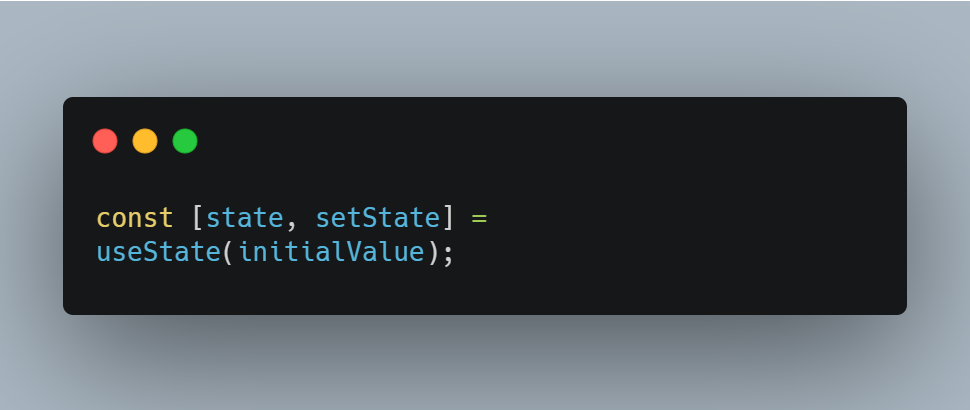
state: The current value of the state.setState: A function to update the state.initialValue: The starting value for the state.Using the Previous State
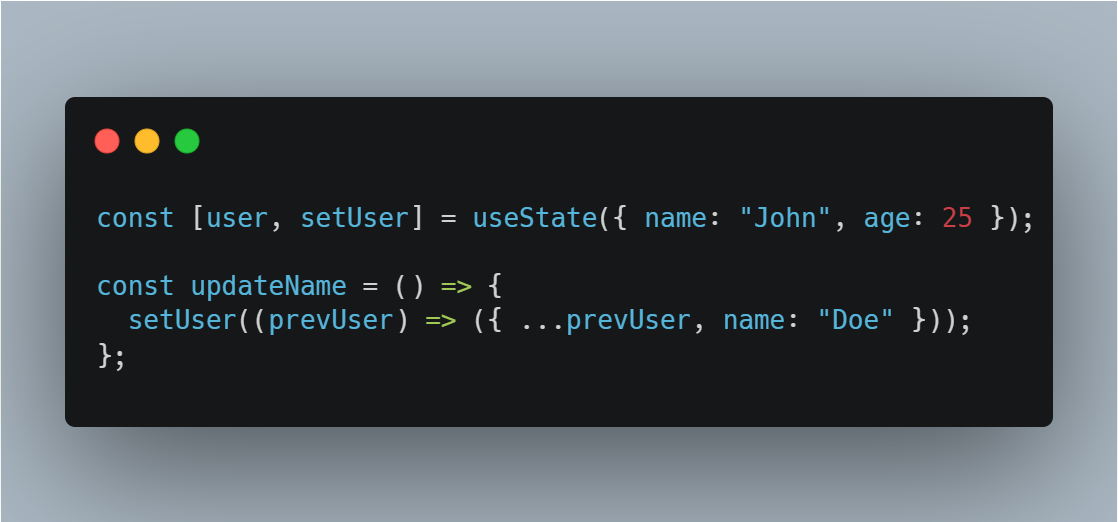
Use a function inside
setStatewhen the new state depends on the previous state.State with Objects or Arrays
When updating objects or arrays, use the spread operator to maintain immutabilities
What is
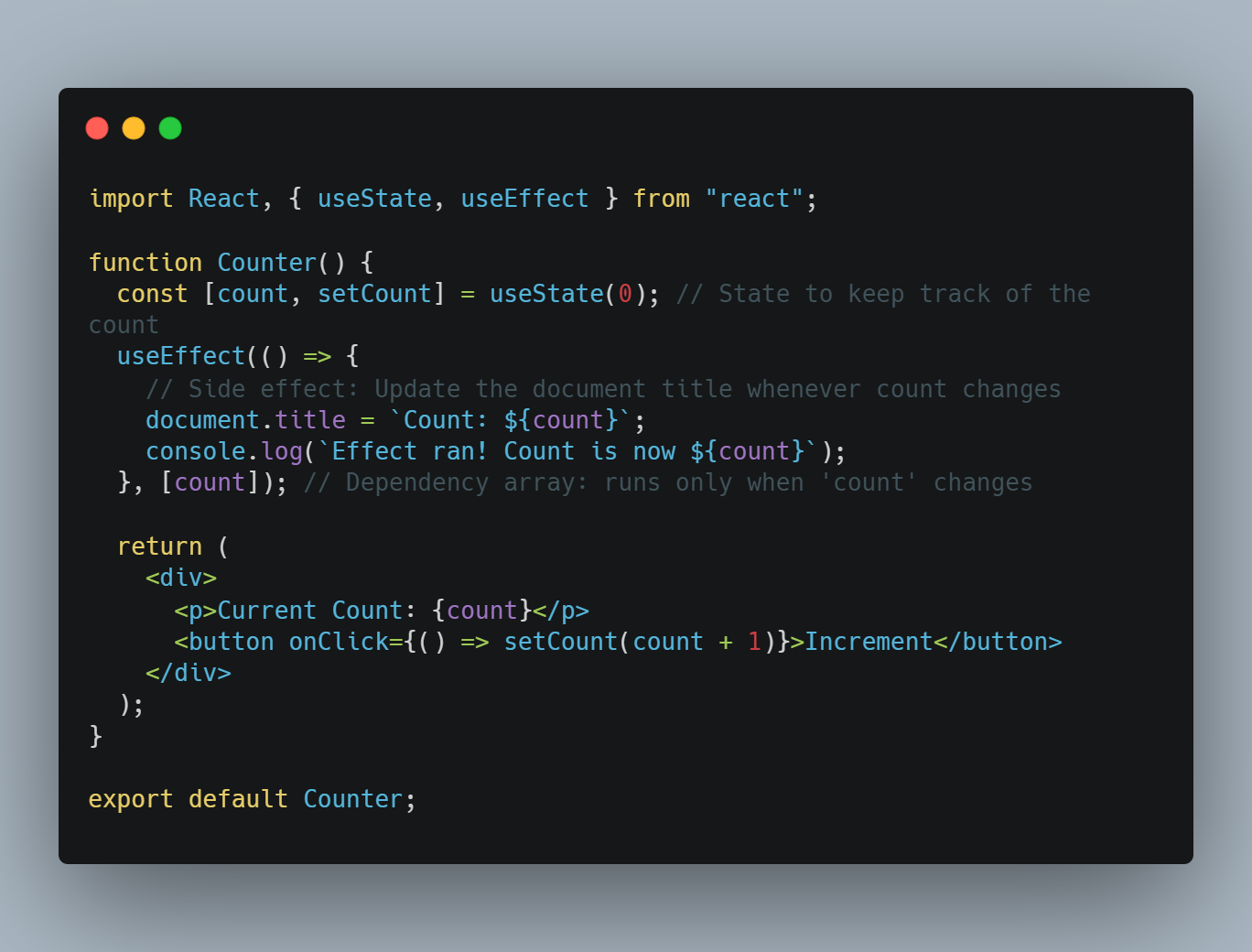
useEffect?useEffectis a React Hook that lets you perform side effects in functional components. Side effects include tasks like:Fetching data from an API.
Subscribing to events.
Manipulating the DOM.
Why useEfect?
Before hooks, side effects were managed in class components using componentDidMount, componentDidUpdate, and componentWillUnmount. With useEffect, you can handle all of these in one function
.Wrapping Up
React hooks like useState and useEffect are game-changers for modern web development. Together, they make managing state and side effects in functional components intuitive and efficient.
What Did We Learn?
useStatehelps manage local state in a simple, clean way.useEffectallows you to perform and manage side effects like data fetching, DOM updates, or subscriptions.Combining them creates dynamic, interactive components.
Key Takeaways:
Start with small examples to understand the basics of
useStateanduseEffect.Use the dependency array in
useEffectwisely to control when effects run.Always clean up resources like event listeners or timers to avoid issues.
What’s Next?
Explore these related topics:
Custom Hooks: To reuse logic across components.
Performance Optimization: Learn about React's
useMemoanduseCallback.State Management: Dive into
useReducerfor more complex state logic.
Your Turn!
Try using useState and useEffect in your projects to build dynamic, real-world applications. Share your progress, questions, or insights in the comments below. Happy coding! 🚀